In this simple tutorial I will show you how I made a little desk clock based on the esp8266 MCU with MicroPython. The project includes include the following features :
- OLED display
- Date and time NTP syncing
- Automatically manage DST for your region
- Temperature and relative humidity display
- Post temperature and humidity to a local MQTT server
Parts
- ESP8266 (I use an Adafruit HUZZAH ESP8266)
- AHT20 sensor (I2C)
- SSD1306 OLED display (I2C)
- 3D printed enclosure (optional)
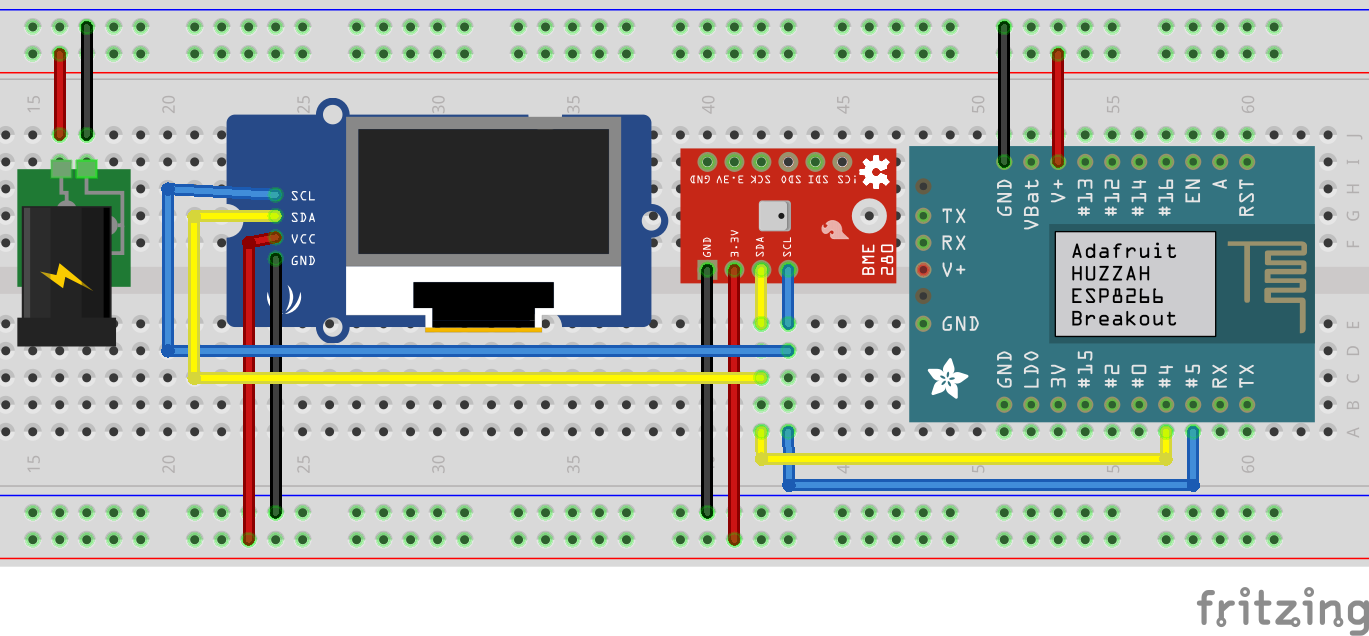
Connections
Code
I will assume you already have a functionning esp8266 with MicroPython. Let’s take a look at the code.
Initialize the I2C communication with the sensor and display. The following code initialize the I2C bus on pin 4 and 5 and then we create two object to interact with our two devices.
1
2
3
i2c = I2C(scl=Pin(5), sda=Pin(4))
sensor = ahtx0.AHT20(i2c)
oled = ssd1306.SSD1306_I2C(128, 32, i2c)
Next we need some information the post data to the MQTT server. Just fill in your information and the ESP should publish to the “5702/roomname/clientid” topic.
1
2
3
4
5
6
7
8
mqtt_user = "YOUR MQTT USERNAME"
mqtt_pass = "YOUR MQTT PASSWORD"
mqtt_client_id = "mp001"
mqtt_server = "YOUR MQTT SERVER IP"
mqtt_port = 1883
mqtt_room = "YOUR ROOM NAME"
mqtt_topic = b"5702/" + mqtt_room + "/" + mqtt_client_id
client = MQTTClient(mqtt_client_id, mqtt_server, port=mqtt_port, user=mqtt_user, password=mqtt_pass, keepalive=60)
The rest of the code is basically the infinite loop that will run after our setup. It is split in 4 parts, reading the sensor and posting to MQTT, updating date and time when minutes changes, display a small animation to show that the MCU is alive and the final part, NTP syncing.
First part of the loop is run each 15 minutes, we first verify that we are connected to a wifi network then we try to read the sensor and populate the stemp and shumi variables. Next, we build our JSON payload, connect to the MQTT server, publish the payload and disconnect. I also added the “MQTT_ACTIVE” flag because I wanted to prevent other tasks to run while this main task was active.
1
2
3
4
5
6
7
8
9
10
11
12
13
14
15
16
17
18
19
20
21
22
23
24
25
26
27
28
29
30
31
32
33
34
35
36
37
38
39
40
41
42
if (pub_first_loop) or (utime.ticks_diff(utime.ticks_ms(), pub_last_tick) > pub_delay_ms): #executed each 15 minutes
      MQTT_ACTIVE = True
      pub_first_loop = False
      pub_last_tick = utime.ticks_ms()
      #Check if WIFI is up
      try:
        if st_if.isconnected() == False:
          st_if.connect(ssid, password)
          while st_if.isconnected() == False:
            pass
      except:
        print("WIFI failed...")
      #Get temp/humi from sensor
      try:
        stemp = sensor.temperature
        shumi = sensor.relative_humidity
        print("Temperature: %0.2f C" % stemp)
        print("Humidity: %0.2f %%" % shumi)
      except:
        print("Sensor reading failed...")
      #Build JSON payload
      try:
        payload = [ {
                    "channel": 1,
                    "value": stemp,
                    "type": "temp",
                    "unit": "c"
                  },
                  {
                    "channel": 2,
                    "value": shumi,
                    "type": "rel_hum",
                    "unit": "p"
                  } ]

        client.connect()
        mqtt_msg = json.dumps(payload)
        client.publish(mqtt_topic, mqtt_msg)
        client.disconnect()
      except:
        print("MQTT publish failed...")
      MQTT_ACTIVE = False
Second part is pretty simple, just check when the minute changes from the current time and update the date, time, temperature and humidity on the OLED display.
1
2
3
4
5
6
7
8
9
10
11
if not last_min == utime.localtime()[4]:
        #OLED
        try:
          now = utime.localtime()
          oled.fill(0)
          oled.text('%0.1f C / %0.1f %%' % (stemp, shumi), 0, 0, 1)
          oled.text('%02d:%02d %02d/%02d/%d' % (now[3], now[4], now[2], now[1], now[0]), 0, 16, 1)
          oled.show()
        except:
          print("OLED update failed...")
        last_min = utime.localtime()[4]
Other part is kinda optional but I like to quickly see if the MCU is alive so I added a small one digit character that changes every 2 seconds.
1
2
3
4
5
6
7
8
9
10
11
12
13
14
15
16
17
18
19
if utime.ticks_diff(utime.ticks_ms(), oc_last_tick) > oc_delay_ms: #loop 1 time per 2 seconds
        try:
          oled.fill_rect(120,0,128,8,0)
          oled.show()
          if oc == 0:
            oled.text("|", 120, 0, 1)
          if oc == 1:
            oled.text("/", 120, 0, 1)
          if oc == 2:
            oled.text("-", 120, 0, 1)
          if oc == 3:
            oled.text("\\", 120, 0, 1)
          oc_last_tick = utime.ticks_ms()
          oled.show()
          oc += 1
          if oc > 3:
            oc = 0
        except:
          print("Active thingy failed...")
Last part is the NTP syncing with an internet time server. This task runs every 60 minutes since the ESP8266 internal RTC drifts a lot.
1
2
3
4
5
6
7
if utime.ticks_diff(utime.ticks_ms(), ntp_last_tick) > ntp_delay_ms: #loop 1 time per hour
        try:
          ntp_sync.sync_localtime()
          print("Synced time OK")
        except:
          print("NTP sync failed...")
        ntp_last_tick = utime.ticks_ms()
Content of “ntp_sync.py”. I found this small script on a forum, sorry don’t remember where, and adapted it to my needs. The most important part is the last couples of lines where it takes cares of DST to always display the correct time of your region.
1
2
3
4
5
6
7
8
9
10
11
12
13
14
15
16
17
18
19
20
21
22
23
24
25
26
27
28
29
30
31
32
33
34
35
36
37
import utime
import ntptime
from machine import RTC

#winter offset and summer offset set for America/Toronto.
def sync_localtime(woff=-5,soff=-4):
    trials = 10
    while trials > 0:
        try:
            ntptime.host = "ca.pool.ntp.org"
            ntptime.settime()
            break
        except Exception as e:
            print(".", end="")
        utime.sleep(1)
        trials -= 1

        if trials == 0:
            print(str(e))
        return

    t = utime.time()
    tm = list(utime.localtime(t))
    tm = tm[0:3] + [0,] + tm[3:6] + [0,]
    year = tm[0]

    #Time of March change for the current year
    t1 = utime.mktime((year,3,(14-(int(5*year/4+1))%7),1,0,0,0,0))
    #Time of October change for the current year
    t2 = utime.mktime((year,11,(7-(int(5*year/4+1))%7),1,0,0,0,0))

    if t >= t1 and t < t2:
        tm[4] += soff #UTC - 4H for EST
    else:
        tm[4] += woff #UTC - 5H otherwise

    RTC().datetime(tm)
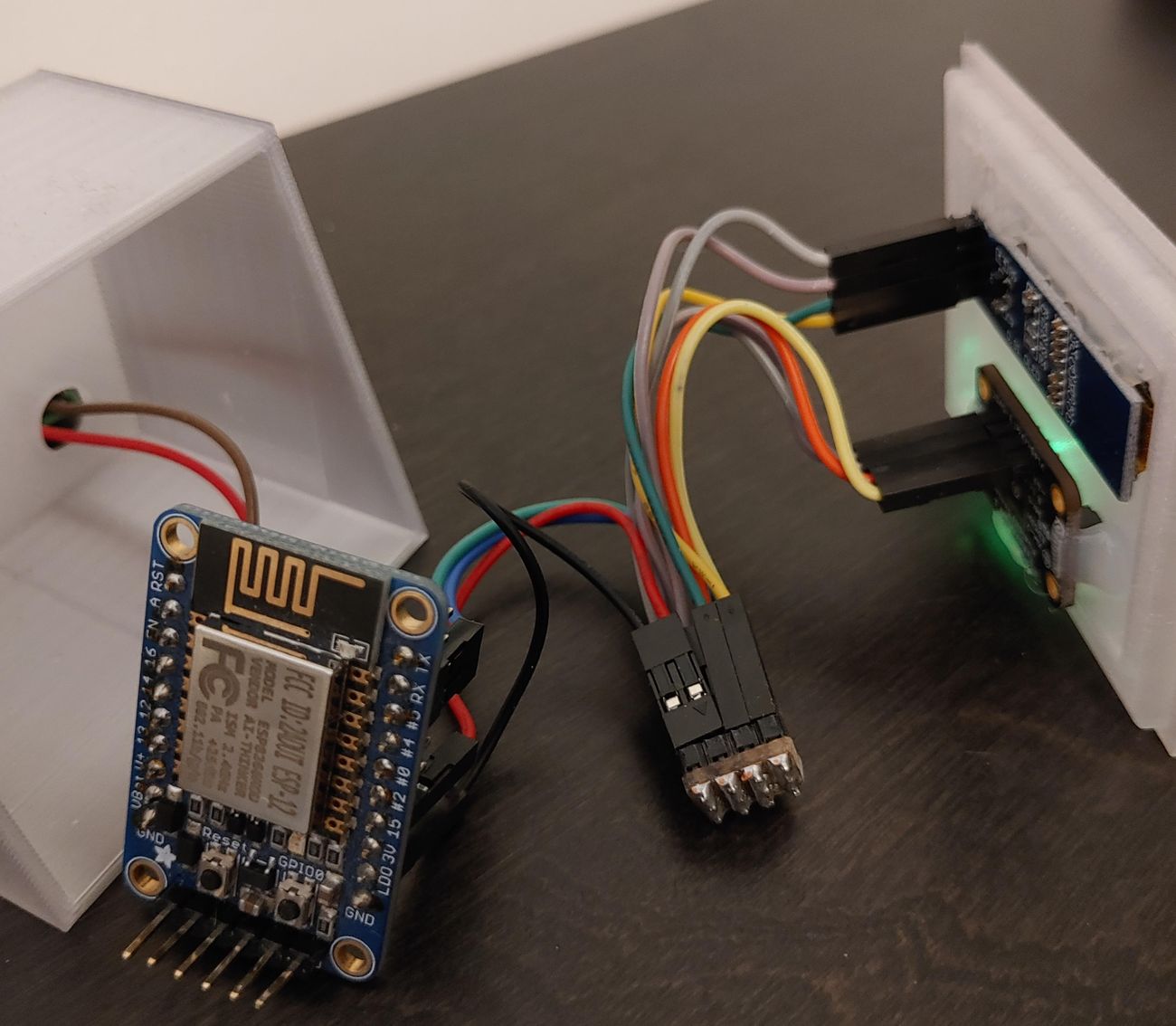
I printed a small enclosure and power the device with a simple 5V wall adapter.
» Complete code available on GitHub «
I hope this can help someone, feel free to ask questions or comments down below!
Thanks for reading ;-)